We've released our Google Ads AI Platform as a free, MIT-licensed open-source project. It is a full-stack application that gives you a Claude-powered chat assistant with live access to your Google Ads data - and the ability to make changes on your behalf.
This post covers why we built it, what it does, the engineering decisions behind it, and the challenges we hit along the way.
The Problem
Managing Google Ads accounts at scale is repetitive and context-heavy. You spend time switching between the Google Ads UI, spreadsheets, and reporting tools. You already know what questions to ask - "which search terms are wasting budget?", "how's campaign X performing versus last month?", "are we bidding on any competitor brand terms?" - but getting answers means clicking through multiple screens and cross-referencing data manually.
We wanted something different: a conversational interface where you could ask those questions in plain English and get answers pulled directly from the Google Ads API, grounded in real account data, with the context of what each account is trying to achieve.
What It Does
The platform has two interfaces to the same underlying toolset:
A web application - Flask backend with a React frontend. Users log in, select a Google Ads account from their MCC, and chat with a Claude-powered assistant. The assistant has access to 18 Google Ads tools (10 read, 8 write), a per-account knowledge base, and web search for current PPC strategy and trends.
A standalone MCP server - The same tools exposed over the Model Context Protocol, so you can wire them directly into Claude Code or any MCP-compatible client. One Python file, stdio transport, no web server needed.
The Chat Interface
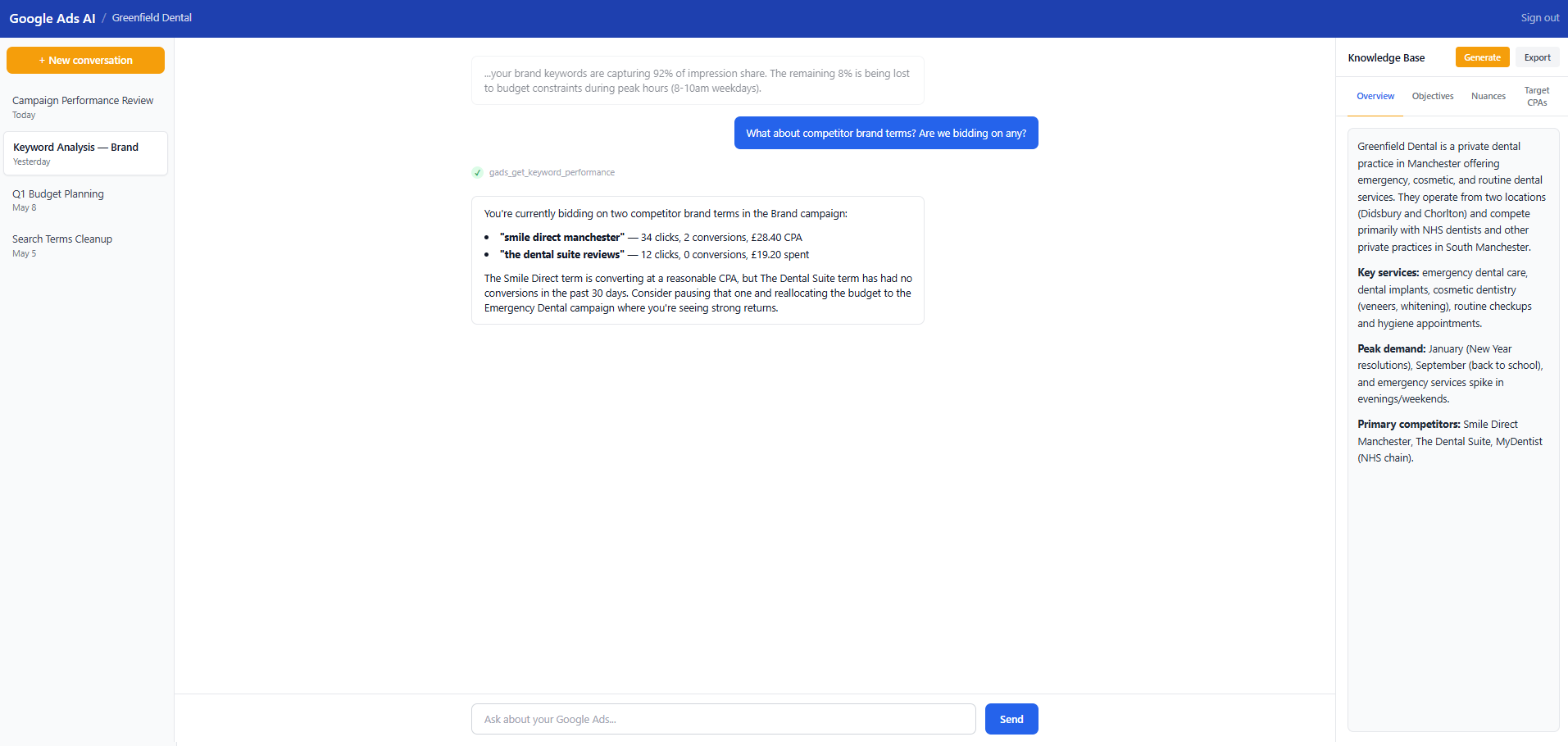
The chat interface is the core experience. You ask a question, the assistant pulls data from the Google Ads API via tool calls, and responds with analysis tailored to the account's objectives. The Knowledge Base sidebar (visible on the right) stores account context - who the client is, what services they offer, who their competitors are, what their target CPAs should be. Claude uses all of this when forming its responses.
In the screenshot above, the assistant has identified two competitor brand terms the account is bidding on. It has pulled the performance data (clicks, conversions, CPA) and made a specific recommendation: one term is converting at a reasonable CPA, the other has had zero conversions and should probably be paused. That is the kind of analysis that would normally require pulling a keyword report, filtering to competitor terms, cross-referencing with conversion data, and applying judgement about the account's goals.
Account Selection
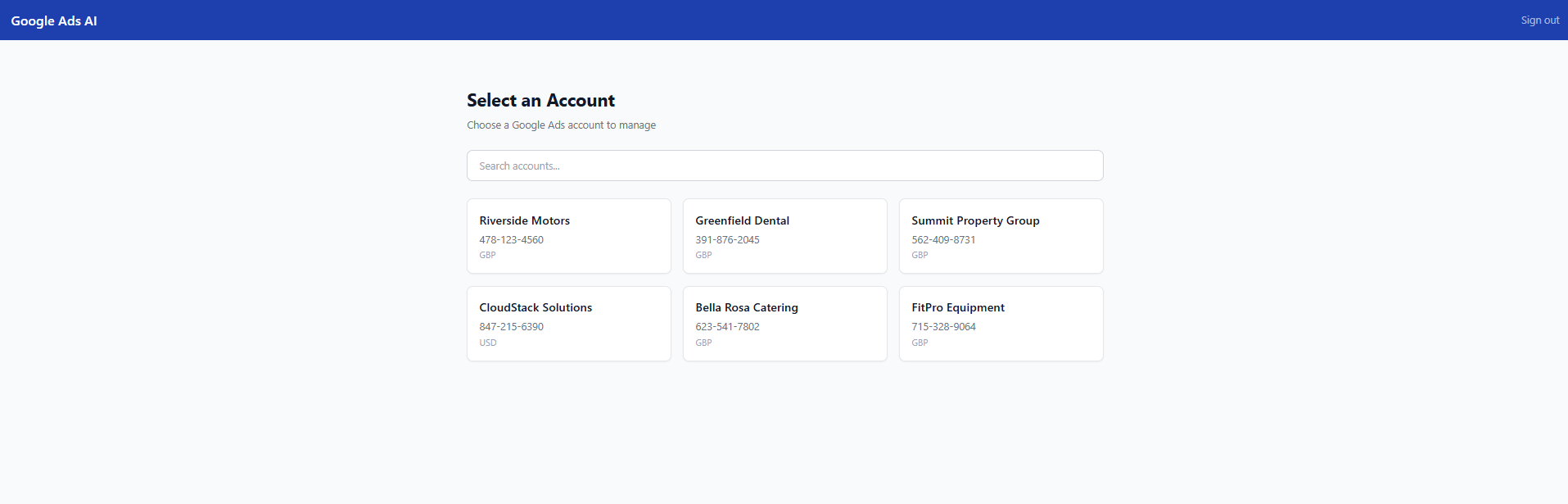
The platform is designed for agencies and multi-account managers. When you log in, you see all the accounts under your MCC. Pick one and you are straight into the workspace. The accounts are synced from the Google Ads API, so as you add or remove accounts from your MCC, they appear automatically.
Write Operations With Safety Guardrails
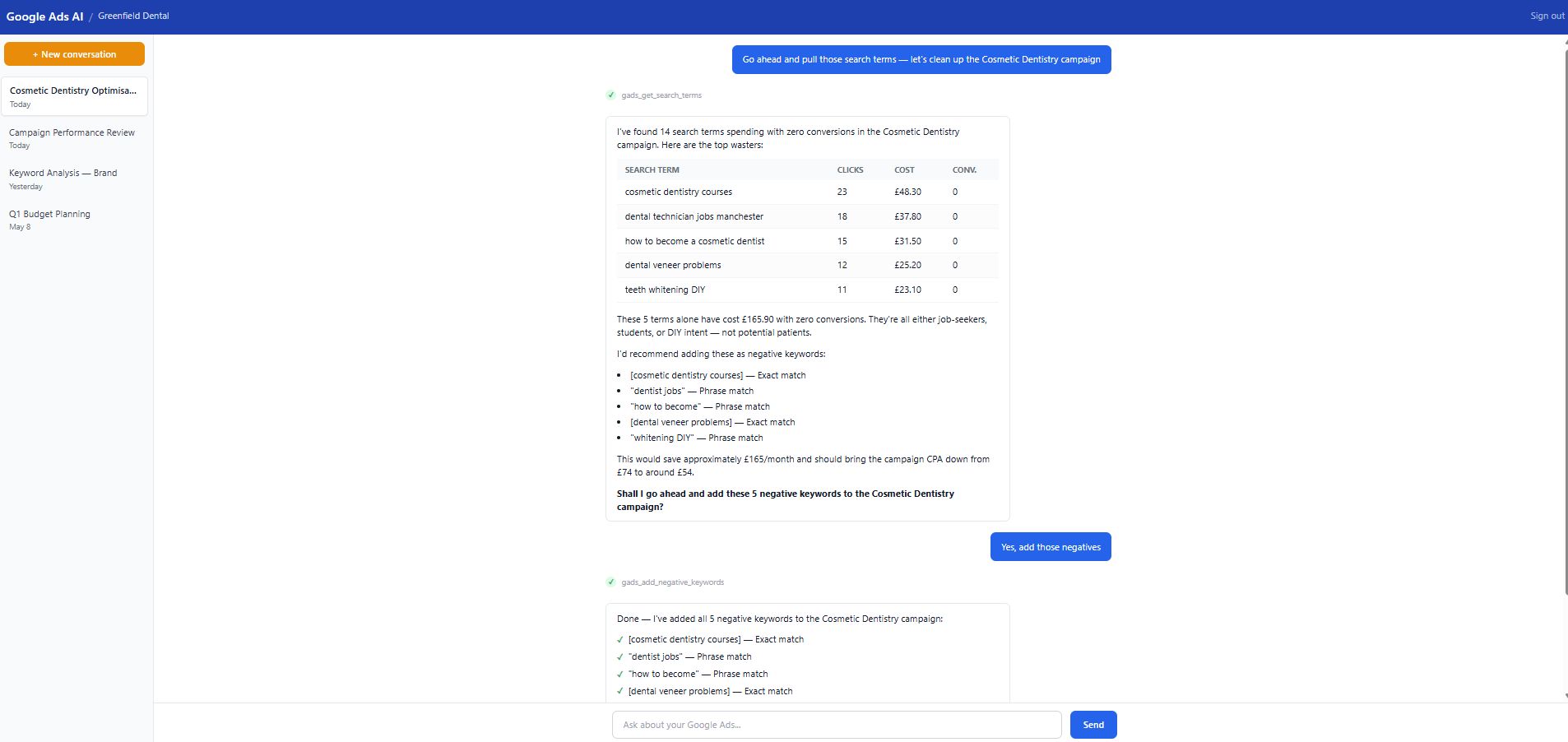
This is the feature that sets the project apart from other Google Ads tools. The assistant can actually make changes to your accounts - not just report on them.
In the screenshot above, the assistant has found 14 search terms with zero conversions in a Cosmetic Dentistry campaign. It identifies the top 5 wasters (job-seekers, students, DIY intent), calculates the total wasted spend, recommends specific negative keywords with match types, and estimates the CPA impact. When the user confirms, it executes the changes and reports back with a checklist of what was added.
The write tools have multiple layers of safety:
- Read-only by default - write access is behind an environment variable (WRITE_ACCESS_ENABLED). You have to explicitly opt in.
- Budget change caps - budget increases are capped at a configurable percentage (default 50%). The tool rejects anything above.
- Confirmation prompts - destructive operations (removing keywords, pausing campaigns) require explicit confirmation. The tool shows a preview of what will change before executing.
- Full audit logging - every mutation is logged with before/after values, the user who triggered it, and a timestamp.
- System prompt guardrails - Claude is instructed to explain intended changes and ask for user permission before executing any write operation.
The Tech Stack
- Backend - Flask 3 with SQLAlchemy 2, PostgreSQL, Redis, and Celery for background tasks. Server-side sessions, CSRF protection, rate limiting.
- Frontend - React 18 + TypeScript + Vite + Tailwind CSS. Server-sent events for streaming chat responses. Markdown rendering for structured tool output.
- AI - Anthropic Claude API with a system prompt that adapts based on the account's knowledge base, target CPAs, and whether write access is enabled.
- Google Ads - The official google-ads Python SDK with GAQL (Google Ads Query Language) for data access and the GoogleAdsService.Mutate API for write operations.
- MCP - FastMCP server with Pydantic input validation, supporting both Markdown and JSON response formats.
- Infrastructure - Gunicorn with systemd service templates, Nginx reverse proxy config, Alembic database migrations. Production-ready from day one.
Engineering Decisions Worth Explaining
Why Server-Side Tool Execution
The tools execute on the server, not in the browser. This means credentials never touch the frontend, rate limiting is enforced server-side, and the audit trail is tamper-proof. It also means the system prompt can be carefully controlled - we do not want users injecting instructions that bypass safety guardrails.
Why a Knowledge Base, Not Just a System Prompt
The Knowledge Base stores structured per-account context: business overview, campaign objectives, target CPAs per campaign, account-specific nuances. This context is injected into Claude's system prompt at runtime. Without it, the assistant can pull data but cannot tell you whether the numbers are good or bad. A £30 CPA might be excellent for dental implants and terrible for routine checkups. The Knowledge Base bridges that gap.
The assistant can also write to the Knowledge Base. During a conversation, if it learns something important about the account ("this client gets most of their emergency calls on evenings and weekends"), it can save that as a nuance that persists across conversations.
Why Both a Web App and an MCP Server
We built the web app first for our own client work. The MCP server came later when we realised the same tools could be useful directly inside Claude Code for quick ad-hoc queries. The two share the same Google Ads API integration but serve different workflows. The web app is for structured analysis with conversation history and knowledge base context. The MCP server is for developers who want to ask questions about their Google Ads data without leaving the terminal.
Why 10 Read Tools Instead of Just Raw GAQL
We do expose a raw GAQL tool (gads_run_gaql_query) for power users, but the 10 structured read tools exist because they encode domain knowledge. gads_get_search_terms does not just run a query - it returns data structured for search term analysis with the right fields, date handling, and formatting. Claude is better at using well-defined tools with clear parameters than constructing GAQL queries from scratch, and the structured tools produce more consistent, useful output.
Challenges
Google Ads API Credentials Are Hard to Get
This is the single biggest barrier to adoption. Getting Google Ads API access requires:
- A Google Cloud project with the Google Ads API enabled
- OAuth 2.0 credentials (client ID and secret)
- A developer token (applied for through the Google Ads UI, requires a manager account)
- A refresh token generated through an OAuth flow
- For write access: Standard API access level (Basic is read-only)
That is a lot of steps before you can even try the platform. We have included a detailed walkthrough in the README and a helper script (generate_refresh_token.py) for the OAuth flow, but it is still a 15-20 minute process for someone who has not done it before.
Keeping Claude Grounded in Real Data
The assistant has access to live data, which is the whole point - but Claude can still hallucinate or make assumptions if not carefully prompted. Our system prompt includes explicit instructions: never fabricate metrics, always pull data before making claims, cite specific numbers from tool results. The 10-signal health assessment framework (conversion tracking, quality scores, budget utilisation, wasted spend, ad copy, account settings, extensions, negatives, Performance Max, brand separation) gives the assistant a structured analytical workflow rather than leaving it to freestyle.
We also had to handle the "anti-hallucination" problem carefully. If the assistant pulls search terms and finds nothing concerning, it needs to say "the search terms look clean" rather than inventing problems to fill the response. Prompt engineering for restraint is harder than prompt engineering for output.
Money Is in Micros, Keys Are in camelCase
The Google Ads API returns currency values in micros (divide by 1,000,000 to get actual amounts) and MessageToDict converts protobuf fields to camelCase. These two quirks propagate through the entire codebase. We wrote format_micros() and safe_get() helpers early and used them everywhere, but it is the kind of thing that trips you up in every new tool you add.
Scrubbing a Private Codebase for Open Source
The platform started as a private tool for managing a specific client's Google Ads accounts. Open-sourcing it meant removing all client branding, credentials, customer IDs, personal information, and project-specific configuration - across hundreds of files. We replaced the original brand colours with generic Tailwind blue, swapped logo images for text logos, made systemd service files and deployment paths generic, and rewrote all test fixtures to use placeholder values. The design spec for the scrubbing process was longer than the spec for any single feature.
Building Write Tools With Appropriate Caution
Adding write capabilities was the most nerve-wracking part. Read-only tools cannot break anything - the worst outcome is a bad analysis. Write tools can pause a campaign that is driving revenue or blow a budget. We added multiple layers of safety (the configurable cap, confirmation prompts, audit logging, opt-in activation), but the biggest challenge was getting the system prompt right: Claude needs to be helpful and proactive about suggesting changes, while also being disciplined about never executing a write operation without explicit user confirmation.
What's in the Repo
- 606 source files across Python backend, React frontend, tests, and deployment config
- 164+ pytest tests covering models, services, blueprints, and CLI commands - all runnable with SQLite in-memory (no external services needed)
- 18 Google Ads tools (10 read + 8 write) with full Pydantic validation
- Comprehensive deployment templates - systemd services, Gunicorn config, Nginx reverse proxy
- Annotated .env.example with links to credential sources
- MIT licensed - use it however you want
Who It's For
- PPC agencies who want to give their team (or their clients) a conversational interface to Google Ads data
- Solo PPC managers who are tired of the Google Ads UI for routine analysis tasks
- Developers building AI-powered marketing tools who want a production-grade reference implementation
- Anyone with a Google Ads MCC who wants to try asking Claude about their ad performance
Try It
The repo is at github.com/sentinel-source/google-ads-ai-platform. Clone it, configure your credentials, and you can be chatting with your Google Ads data in under 10 minutes (assuming you already have API access).
If you do not have Google Ads API credentials yet, the README includes a step-by-step walkthrough for getting them. And if you just want to see what the interface looks like, the screenshots above give a good sense of the experience.
We welcome contributions, feedback, and feature requests via GitHub issues. The codebase is well-tested, well-documented, and designed to be extended - adding a new tool is a four-step process documented in the README.